



 win
win

 Super Resolution
  Video Stabilization
  Frame Interpolation

 Denoise Image
  Restore Old Photo
  Unblur Image
  Recover Face
  Upscale Image
  Colorize Photo
 Video Conversion >
 Video Compression >
 Screen Recording >








Top 10 Ways to Convert MKV to MP4 Quickly without Quality Loss
MKV, also known as Matroska, is a container to store multiple video, audio, subtitle tracks in a variey of codecs, such as HEVC, H.264, DTS, Dolby Digital audio, or SRT etc. It is a universal format that used for storing common multimedia content, like movies or TV shows in high quality. For example, you can get some .MKV files from online downloads, Blu-ray or DVD rips from MakeMKV.
However, MKV is not powerful enough to replace all the other formats owing to its poor compatibility. Many mobile devices and programs refuse to open or recognize MKV video files. Then, you need to convert MKV to a more compatible video format, like MP4.
In this article, we'll show you top 10 ways to convert MKV to MP4 for free without quality loss.
Hot search: 20 Best Video Converters That You Can't Miss in 2026
Free Download the Best MKV to MP4 Converter – Winxvideo AI
Convert MKV to MP4 easily, with or without re-encoding. The smart Auto Copy mode enables ultra-fast MKV to MP4 conversion by preserving the original video codec – delivering results in seconds with zero quality loss!
- 1. Accelerated by multi-core CPU and GPU for blazing-fast speed.
- 2. Accepts all MKV files, regardless of resolution or codec.
- 3. Offers MP4 output options with H.264, HEVC, or MPEG4 codecs.
- 4. Supports batch conversion and includes 420+ output presets.
Table of Contents
Part 1. How to Convert MKV to MP4 on Windows & Mac
As mentioned above, there are many reasons to change MKV files to the more widely supported MP4 format. The only question is — how?
Below we've rounded up some of the best MKV to MP4 converters to help you get the job done quickly and for free, whether you're using Windows or macOS.
#1. Winxvideo AI
A full-featured solution for batch MKV to MP4 conversion.
If you're looking for an efficient and versatile tool to convert MKV to MP4, Winxvideo AI should be at the top of your list. This software allows you to convert files to MP4 with or without re-encoding. No matter the resolution or codec of your MKV files, Winxvideo AI can handle them with ease.
Key Features:
- MP4 Presets & Codec Support: Winxvideo AI offers multiple MP4 presets, supporting video codecs such as H.264, HEVC (H.265), and MPEG4. You can also customize settings for resolution, quality, bitrate, and frame rate (FPS), giving you full control over the conversion process.
- High-Speed Conversion: Thanks to its full utilization of both CPU and GPU, Winxvideo AI boosts conversion speeds up to 47x faster than real-time on computers equipped with QSV-supported Intel processors (2nd to 6th generation) and CUDA/NVENC-enabled NVIDIA GPUs.
- Batch Conversion Support: Have multiple MKV files to convert? Winxvideo AI supports batch processing, making it easy to convert many files at once.
Beyond MKV to MP4 conversion, Winxvideo AI supports over 370 input formats and offers 420 output presets, making it one of the most versatile tools available. It’s not just a video converter; Winxvideo AI also supports video compression, editing, enhancement, stabilization, frame interpolation, and more.
Pros:
- Fast conversion speeds with hardware acceleration.
- Wide range of supported formats and presets.
- Batch conversion support.
Cons:
- Limited features in the unregistered version.
How to Convert MKV to MP4 on Windows 10/11 and macOS with Winxvideo AI
To get started, download the appropriate version of Winxvideo AI for your computer, install it, and follow the steps below to convert MKV to MP4 quickly.
Step 1. Load the MKV Files
Open Winxvideo AI and, from the main interface, select the Video Converter option.
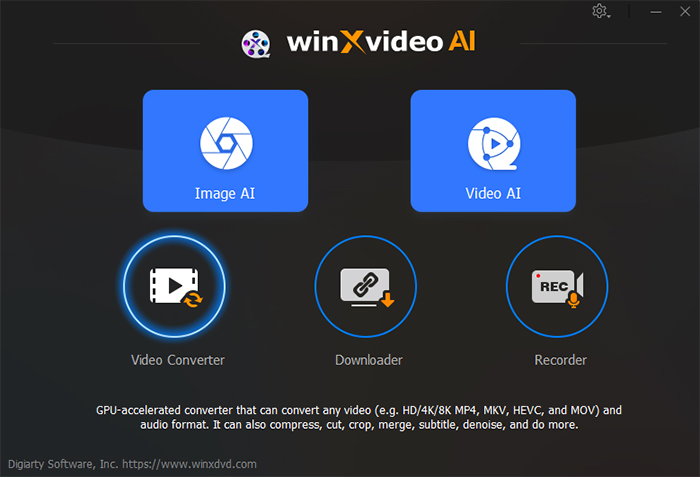
Once inside, click the + Video button to browse and select your target MKV files. If you have multiple files, simply select them all to start batch video conversion.

Step 2. Choose MP4 as the Output Format
At the bottom of the interface, you'll find tabs for Popular, Video, Device, Music, and Toolbox. Select the Video tab and choose the desired MP4 format.
Alternatively, you can click Target Format and select the MP4 profile from the list.
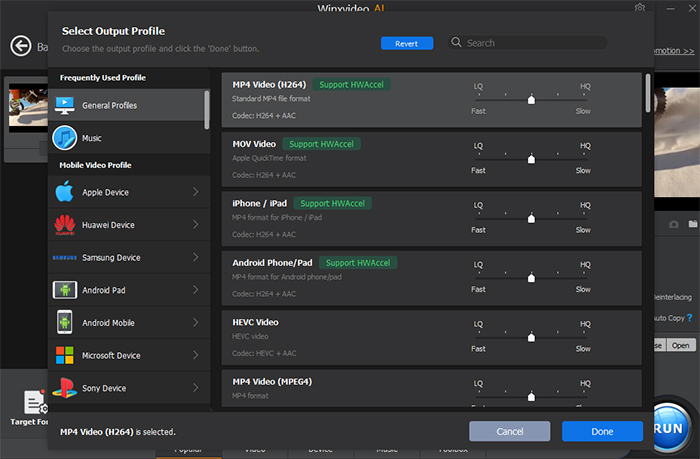
Tip: If your MKV file is already encoded with H.264 or H.265, you can check the Auto Copy option at the bottom-right corner. This allows for a direct copy of the media data from MKV to MP4, skipping re-encoding and speeding up the conversion by up to 10x.

Step 3 (Optional). Adjust Video & Audio Settings
If you'd like to fine-tune your output, click the Codec Option button to adjust video and audio settings, such as resolution, bitrate, and audio codec.
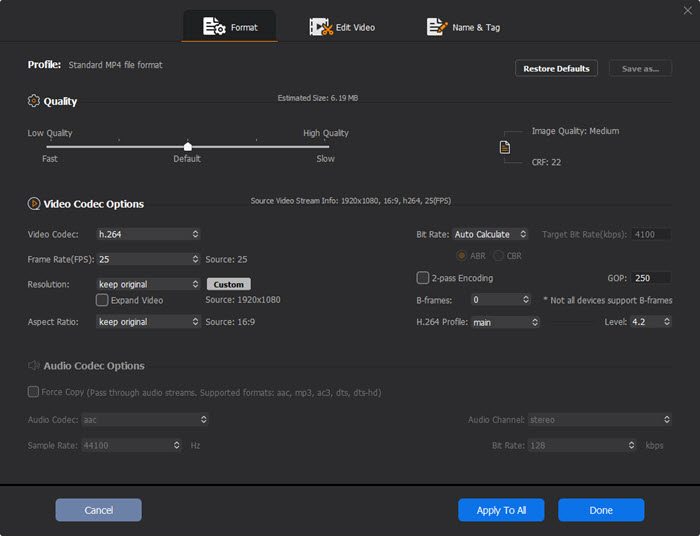
Step 4. Start the Conversion
Before starting, you can choose a different destination folder if you don’t want the converted files to be stored in the default location (C:\Users\PC\Videos\Winxvideo AI). Once you’re ready, click the RUN button to begin the conversion process.
Winxvideo AI offers a fast, reliable, and comprehensive solution for converting MKV to MP4, along with a range of other video tools for your editing and enhancement needs.
Video Tutorial: How to Convert MKV to MP4 without Losing Quality
#2. Freemake Video Converter
Best fit for free converting MKV to MP4 for Windows users.
Freemake Video Converter has been a sought-after free video converter for Windows for over 10 years. What makes it unique are the sceurity, reliable converting process and wide video formats support, certainly including converting MKV to MP4 on Windows 10/11. Moreover, it allows users to convert DVD disc, create photo slideshow, edit videos and so on. The bad thing for Freemake is that the output video is usually stamped with annoying watermark.
Pros:
- Compatible with many input and output formats, supporting up to 4K UHD.
- Merge video files and import subtitles.
Cons:
- Only available on Windows platform, including Windows 11/10/8/7.
- No support for AV1 codec.
- Videos processed by free version will be stampted with Freemake watermark.
How to change MKV container to MP4 on Windows 11/10/8/7 with Freemake Video Converter
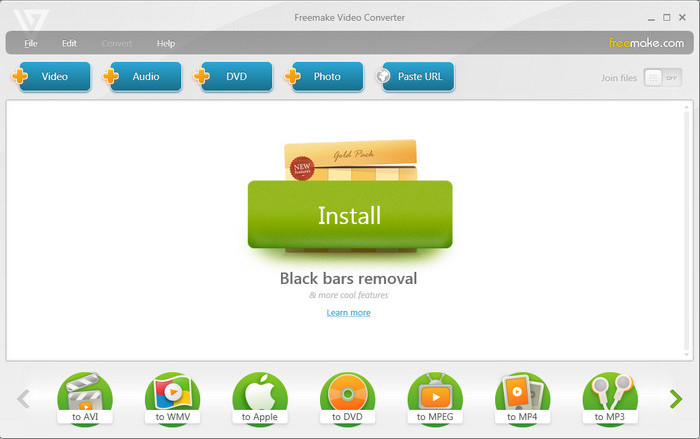
Step 1. Free download the program and launch it on your computer. Click "+ Video" button to import your target MKV video files.
Step 2. Choose "to MP4" as the output format from the output format bar at the bottom of the interface.
Step 3. Click "Convert" to change MKV file to MP4 on Windows PCs.
#3. VLC Media Player
The simplest MKV to MP4 transcoding solution for Windows & macOS users.
You may be familar with VLC as a free and popular multimedia player that supports video playback of many formats. Can VLC convert MKV to MP4? Certainly yes. VLC can also be used as a video converter to changing video format, including MKV to MP4. Though it may be not as powerful as professional video converters, it fully meets the common video format conversion needs on Windows and Mac if you don't want to install any extra software on your computer.
Pros:
- Easy to use, free and available on cross-platforms.
- No need to download any other third-party video converter if you've installed VLC media player.
- Update constantly to support the latest codec such as AVI, H.265 etc.
Cons:
- Limited video output support.
- Conversion isn't speedy. Can't merge video clips.
Step-by-step guide to convert MKV files to MP4 via VLC
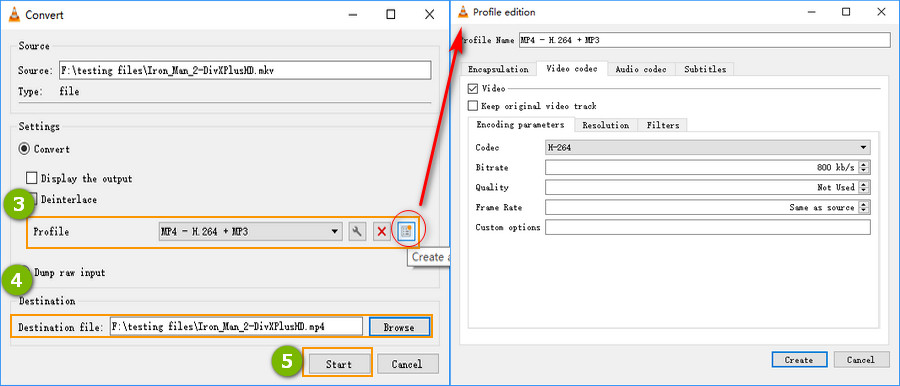
Step 1. Open up VLC on your computer (take Windows 10 PC as an example), and click Media on the toolbar and select Convert / Save to enter a new Open Media window.
Step 2. Click Add button to browse and import your target MKV video. It supports to import several videos at once. Then click Convert / Save button.
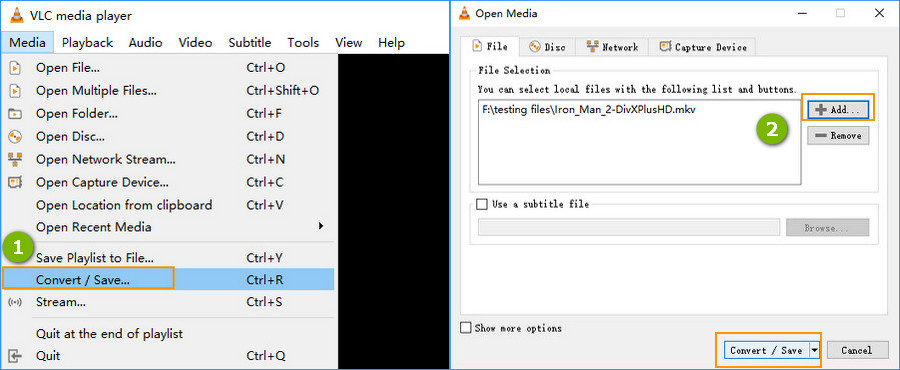
Step 3. Choose Video - H.264 + MP3 (MP4) as the output format. If you'd like to convert MKV to other formats or devices, you can click the drop-down list to select your desired one. You're able to cutomize video details like video / audio codec, subtitles through Edit selected profile button besides the drop-down list.
Step 4. Click Browse to specify the destination path for the output video.
Step 5. When you're done, click Start button to comvert MKV to MP4
#4. HandBrake
An open-source MKV to MP4 converter download for transcoding .mkv to .mp4.
HandBrake is another MKV converter that allows you to convert videos to MKV or MP4, embedded in H.264, HEVC, MPEG-2, MPEG-4, Theora, VP8 and VP9. Also, HandBrake empowers users to use third-party libraries such as x265, FFmpeg, and libvpx to convert videos. If you want to adjust video parameters like resolution, frame rate, bit rate, aspect ratio or simply edit videos, HandBrake can do it all. However, it's criticized for making files bigger after MKV to MP4 conversion, getting subtitle messed, and running really slow even on a new fast core CPU with large RAM. Anyway, as a free and open-source video converter, HandBrake is still a nice option for MKV to MP4 conversion.
Pros:
- Free, even the novice can use it without learning curve.
- Both able to convert videos and DVD discs.
Cons:
- Only support to convert video to MKV and MP4.
- Slow conversion speed while converting 4K footage.
Tutorial on how to convert from MKV to MP4 via HandBrake
Step 1. Download HandBrake from it's official site, and launch it.
Step 2. Click Open Source or simply drag and drop to import your target MKV files.
Step 3. Choose MP4 as the output format below the Summary column.
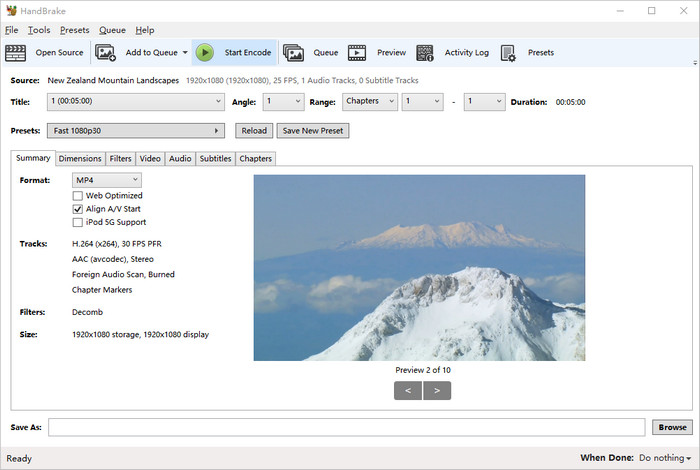
Step 4. Tweak the video setting if necessary. You're able to adjust video dimensions, resolution, frame rate, codec, quality, audio, subtitles, deinterlace, denoise, sharpen video and crop, rotate, flip video etc.
Step 5. Click Browse button to choose a destination folder for the output video.
Step 6. Tap Start Encode and wait. The MKV to MP4 conversion will be activated and finished soon.
#5. FFmpeg
Best fit for those who knows something about commands.
FFmpeg is a free and open-source software project that based on command lines. It offers a complete, cross-platform solution to record, convert and stream audio and video, including MKV to MP4. But for novices, FFmpeg can be hard to use. Kowning the basic command lines could help a lot. To convert MKV to MP4, the basic command line is "ffmpeg -i input.mkv output.mp4". Here is the detailed explation of this command line:
- ffmpeg: a necessary part to tell the OS who is using the command line.
- -i: the abbreviation of input, means the following file is the original file to be converted.
- input.mkv: the file that is to be converted. You can input two files at once through "ffmpeg -i input1.mkv input2.mkv".
- output.mp4: The output file is in MP4 container.
Pros:
- Excellent codec and filter support
- Support a large number of encoders and decoders
- Provide video streaming and web hosting capabilities
Cons:
- It's not easy for beginners to use and implement.
- The official documentation is not clear and can be quite confusing.
[With command lines] MKV to MP4 FFmpeg tutorial
Step 1. Download FFmpeg from its official site - https://ffmpeg.org/download.html. Then configure FFmpeg on your computer.
Step 2. Press Win + R and input cmd to enter the DOS window.
Step 3. Input cd test video. Now I'm in the location where store the MKV video.
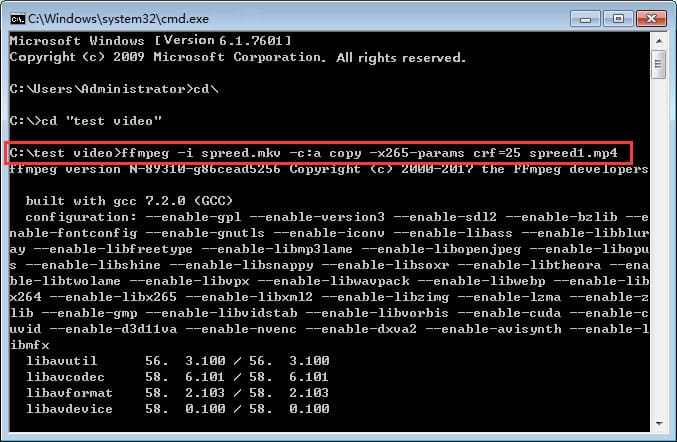
Step 4. Input FFmpeg command line: ffmpeg -i spreed.mkv -c:a copy -x265 -params crf=25 spreed1.mp4
- -c:a copy means keeping all the copies of audio streams.
- x265 params: Passing options are passed to x265 with the -x265-params argument.
- crf=25 refers to encode video in a not bad quality. (CRF, the abbreviation of Constant Rare Factor. The CRF scale is 0-51, where 0 is lossless, 23 is the default, and 51 is worst quality possible.)
Step 5. Press Enter on the keyboard. Then, you'll get the desired .mp4 file.
Of course, there are many other FFmpeg codecs, for example, to map ALL streams, namely remuxing MKV to MP4, you need type in the command line: ffmpeg -i spreed.mkv -map 0 spreed1.mp4. Know more about FFmpeg codecs >>
#6. remux
Best for macOS users to convert MKV to MP4 and other popular formats.
remux is straightforword MKV to MP4 converter on Mac based on FFmpeg tool. This means users can enjoy ffmpeg ability for encoding MKV, MP4, M4V, AVI, TS, or VOB media files, but get rid of arcane command lines. This Mac MKV to MP4 converter is available on OS X 10.8.0 or later. It allows you to change container without re-encoding, such as MKV to MP4, MP4 to MOV, TS to WMV etc., select, rearrange, and duplicate tracks. and convert DTS to AAC/AC3 for Apple TV, PS5 etc. Also, batch processing on remux is available to reduce the conversion time.
Pros:
- Based on FFmpeg, it's able to quickly create MKV, MP4, M4V, AVI, TS, HEVC or VOB media files.
- Change container without re-encoding.
Cons:
- Only available on macOS.
Here we go for easy steps to convert .MKV to MP4 on Mac with remux
Step 1. Open up the remux.app on your Mac computer. It works on OS X10.8.0 or later.
Step 2. Open the video file you want to remux to another format by clicking 'Files' >'Open' on the toolbar.
Step 3. Select the desired new container format from the popup button in left upper coner of the window.
Step 4. Select the filename via 'Save as' button. And tap 'Go' icon to start the .mkv to .mp4 remux process.

Part 2. How to Convert MKV to MP4 Online
For those who don't want to install any extra MKV to MP4 programs on the computer.
Online video converter is another popular choice for MKV to MP4 conversion. In this way, you don't have to download any other programs or plugins. You can rely on your browser entirely to convert MKV to MP4 on any operating systems. But it's worthy noting that online video converter usually has strict file size limit for the free account. Anyway, it's still a nice choice to convert the not too big MKV video files to MP4 format. Here we have listed the top ones that users use most.
#1. CloudConvert
CloudConvert is a web-based video converter that allows you to convert video from or to any formats. Actually, besides desktop video converting programm, online video converter is also a popular choice for converting MKV to MP4 as it requires no third-party software or plugins installed. It's quite easy and convenient, but not that user-friendly for large MKV files conversion. CloudConvert cannot convert the video more than 1GB for free accounts. You need to buy a package to convert larger files.
Anyway, let's check how to convert MKV to MP4 online with CloudConvert.
Step 1. Navigate to CloudConvert MKV to MP4 official site.
Step 2. Click Select File to import your MKV to CloudConvert. It allows you to load videos from computer, by URL, from Dropbox, Google Drive and OneDrive.
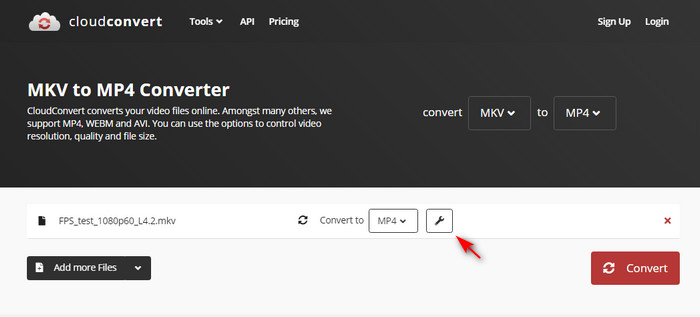
Step 3. Click Settings option to customize video parameters if necessary. You're able to adjust video resolution, frame rate, bitrate, codec, audio, subtitle as you need.
Step 4. Click Convert button to start converting and wait.
#2. FreeConvert
FreeConvert supports to convert MKV to MP4 on Windows 10/11, Mac, Linux or any mobile device. You can simply upload a MKV file and select MP4 as output format. Actually, FreeConvert is available for various types of media conversion, such as videos, audios, images, e-books, up to 1500+ file conversions. Also, it has good reputation of secuirty and privacy with the support of 256-bit SSL encryption. And all your uploadings will be deleted automatically after 2 hours of conversion. Likewise, the max file size of its free account is 1GB.
Here are the easy steps for converting MKV to MP4 on FreeConvert
Step 1. Visit FreeConvert MKV to MP4 Converter page.

Step 2. Click Choose File icon to upload your MKV video from device, Dropbox, Google Drive, or URL.
Step 3. Make sure you've selected MP4 as the output format.

Step 4. Hit the Convert To MP4 button to start your conversion.
#3. ConvertFiles
ConvertFiles is also a widely used online service for MKV to MP4 conversion. Like other online video converters, you can easily upload your source video, convert the video format, and download them instantly. But there are some slight differences for ConvertFiles. For example, with ConvertFiles, you have to load your MKV files from local, and there is no advanced option for adjust video parameters.
How to transcode MKV to MP4 with ConvertFiles
Step 1. Go to ConvertFiles MKV to MP4 Converter page.
Step 2. Click on Browse button to load your MKV file from local.

Step 3. Choose MP4 as the output format.
Step 4. Click on Convert button. Then the video start uploading and converting. You can download the converted MP4 video when it done.
#4. Converter.app
Converter app is an unique collection of file converters online. It's easy to use, 100% free and unlimted. Users are able to convert any MKV videos even the large files that's less than 1 GB into the MP4 format at lighting-fast speed in a loss-less fashion wherever possible. Everything happens without frustrating waiting time and the output quality is as close as the original ones.
How to convert MKV file to MP4 online via Converter App?
Step 1. Visit Converter app MKV to MP4 page. Select the MKV video you want to convert and upload it here.
Step 2. Wait until the conversion from MKV to MP4 has finished. The process starts automatically.
Step 3. Download the freshly created MP4 video.

Suggested reading: more online MP4 video converters >>
Part 3. MKV vs MP4 Comparison
Many of you probably don't know much about MKV or MP4, and may be confused on why you need to convert MKV to MP4. For that, we have compared MKV and MP4 in details and go deep for what you can benefit from MKV to MP4 conversion.
Firstly, MP4 is more widely supported for playing video on a browser, and it has less file overhead. MKV is more popular for converting DVDs and Blu-Ray discs to video files. Here are the details for MKV vs MP4 comparison.
MKV |
MP4 |
|
Video Supported |
H.264, H.265, MPEG1, MPEG2, MPEG4 … |
H.264, H.265, Xvid, MPEG4, … |
Audio Supported |
FLAC, ALAC, AC3, AAC, DTS … |
ALAC, MP3, AAC, … |
Bit-depth |
8bit, 10bit |
8bit, 10bit |
Closed Caption Supported |
ASS, SSA, … |
Not available |
Quality |
Same high |
Same high |
File Size |
Relatively large |
Relatively small |
Platform Compatibility |
Not so good on mobile devices |
Very good on both PCs and mobile devices |
What You Can Benefit from MKV to MP4 Conversion?
1. Fix MKV file not playing on your devices issue.
As MKV can be encoded with various codecs like VP9, HEVC, MPEG4, H.264, VP8, Xvid, AAC, MP3, DTS audio codec etc., there is a greate possibility that your device or media player doesn't support one of the specific codec, leading MKV files no sound, black screen, missing subtitles, or absolutely not playing.
2. Import MKV to any video editing software without any problem.
Owing to the MKV codec and video editing software version issues, some MKV videos failed to be imported to video editing software like Adobe Premiere Pro, or iMovie etc. You have two ways to get out of the trouble: convert MKV to the video editing software supported formats like MP4, or upgrade the video editing software to the latest version if it supported MKV files now.
3. Reduce the MKV video file size.
Since MKV supports to encode multiple video, audio and subtitle tracks, it's inevitable that MKV files always take up larger storage space for their large size. Coupled with the increasing popularity of 4K UHD, 4K MKV can be in exaggeratively huge. However, ordinary players and software are incompetent to handle such large videos. Still, large 4K MKV video cannot be opened in the under-powered computer, causing errors like pixelated 4K MKV playback, or dropping frames. On the one hand, MKV to MP4 conversion can reudce video file size through high compression algorithm, on the other hand, it can help you remove some unwanted tracks to get a smaller size video in MP4.
Part 4. FAQs
1. How can I convert mkv to mp4 with more than 1 gb?
Obviously, you need a video converter that has no limit on file size. Then it's better to be faster and high quality. Winxvideo AI precisely meets all the conditions. Simply load your large MKV video, choose MP4 as output format, tap RUN button. All done.
2. Can Windows convert mkv to mp4?
Nope. You have to rely on a third-party software to convert MKV to MP4. There is no built-in software for MKV to MP4 conversion on Windows.
3. Is it safe to convert mkv to mp4 online?
Yes, to some degree. Online video converters claim that they are safe to convert MKV to MP4 with the 256-bit SSL encryption. But after all, they rely on uploading data to the network for conversion, which lead to a risk of data leakage. You need to know that there is a big difference between converting MKV to MP4 on desktop and online. Online video converter depends more on network and doesn't accept oversized videos. Comparing with Winxvideo AI, it's far backward from for converting 4K UHD, high frame rate HD MKV files.

4. What's the fastest way to convert MKV to MP4?
Firstly, you need a MKV to MP4 converter that's available for hardware acceleration. WinX could be a nice choice. It not only allows you to transcode MKV to MP4 HEVC/H.264 powered by Intel QSV, nVIDIA, CUDA hardware acceleration, but also copy MKV to MP4 without changing the underlying codec to achieve the fastest converting speed.
5. What is the best free mkv to mp4 converter?
When you're choosing a free MKV to MP4 converter, the ability of video conversion is always in top priority. Besides that, video converting speed, output quality, the supported formats are all mattered. Put these together, we've listed top 10 free MKV to MP4 converters:
- Winxvideo AI
- VLC
- HandBrake
- FFmpeg
- CloudConvert
- Xmedia Recode
- Avidemux
- OBS
- FreeConvert
- ConvertFiles
6. Can I just rename mkv to mp4?
Yes. With Winxvideo AI, you can tick on the box of Auto Copy, it allows you to convert the MKV container to MP4 container without changing the underlying codec. This process just copy media file data from MKV to MP4 container format without decoding or re-encoding and the speed will be boosted up to 10X faster than transcoding.  Get it free to remux MKV to MP4 now!
7. Does converting MKV to MP4 lose quality?
Actually, there are two ways for MKV to MP4 conversion: convert MKV to MP4 with or without re-encoding. Only if you convert video without re-encoding - what we call remuxing MKV to MP4, you can get MKV to MP4 converted without losing quality. Programs like Winxvideo AI and Xmedia Recode can remux MKV to MP4 easily.
Related external sources:
[1] MKV: MKV is an open standard container format, which can hold an unlimited number of video, audio, picture, or subtitle tracks in one file...
[2] MP4: MPEG-4 Part 14 or MP4 is a digital container format commonly used to store video and audio, as well as other data such as subtitles and still images...