



 win
win

 Super Resolution
  Video Stabilization
  Frame Interpolation

 Denoise Image
  Restore Old Photo
  Unblur Image
  Recover Face
  Upscale Image
  Colorize Photo
 Video Conversion >
 Video Compression >
 Screen Recording >


How to Convert MKV to MPEG Video for Free with Ease
MKV is absolutely a widely-used free video container format of high quality, which can hold various video, audio, and subtitle tracks. You may find many videos in your daily life are encoded in .MKV format, such as the movies/videos you downloaded from the web, ripped from Blu-ray or DVD discs or whatever.
However, the problems of playing MKV files have been puzzling us all the time. For example, your devices may not recognize the MKV videos of HEVC, DTS or some certain codecs. Or you may be noiced with MKV not playing error when you're trying to play it on HDTV, Xbox, iPhone iPad or Android phones etc. Given that, you'd better convert MKV to MPEG for better compatibility.
This article will show you how to convert MKV to MPEG video for free with ease.
Table of Contents
Part 1. What Is Essential to Transcode MKV to MPEG
MKV is a high quality video container format that can contain multiple audio / video tracks, pictures, interactive menu and subtitles. To convert MKV to MPEG, there are somthing you should make sure:
- The high quality reserved. I bet none of you can bear the obvious video quality loss after you convert MKV to MPEG video.
- As there are various types of MPEG video, you need to figure out you should convert MKV to MPEG-1, MPEG-2 or MPEG-4 depending on your needs.
- MPEG-1: The first MPEG compression standard, always used on Video CD and low-quality DVD Video.
- MPEG-2: The advanced edition of MPEG-1, which is widely used on SVCD and DVD, DVB and ISDB, digital satellite TV services, digital cable television signals, over-the-air ATSC digital television, etc.
- MPEG-4 AVC: That is commonly known as H.264.
- It could be better if there is a MKV to MPEG converter that could convert MKV to MPEG-1, MPEG-2, MPEG-4 easily without any trouble.
Part 2. Download The Best MKV to MPEG Converter Now
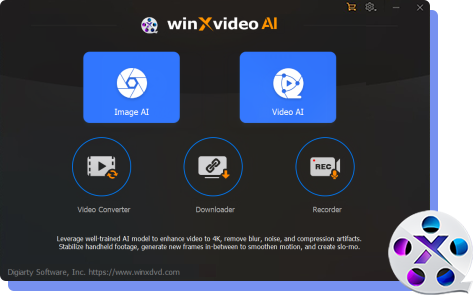
Winxvideo AI is a MKV to MPEG converter that could fulfill MKV to MPEG conversion within such a short time and still maintain the excellent quality. With it, you can easily convert MKV to MPEG-1, MPEG-2, MPEG-4, MP4, H.264, HEVC, MOV, AVI, FLV etc.
It also plays a role of transferring and converting HD camcorder video to the format with more popularity. E.g. convert Panasonic, Canon, Sony, and JVC HD-Camcorder videos: AVCHD, MOD, TOD, MTS, to AVI, MPEG, MP4, FLV and other most popular video formats, so that you can play AVCHD on iPhone/iPod/iPad or burn it to DVD profile and edit the video in Windows Media Center, rather than have most funny videos but entertain nobody.
Part 3. How to Convert MKV to MPEG Video with Ease
Winxvideo AI is available for free download on Windows and MacOS. Tiny file size allows users easily and fast get it installed and launched. After a brief installation, the main interface will pop up spontaneously.
Step 1: Firstly you can import your target MKV video into Winxvideo AI by clicking Add File button. And as for these videos you do no need to convert or have converted already, the Clear button will clear them out of the file list window. Besides, freely selectable language tracks give you plenty options to convert video with prefered language track.
Step 2: And then, under the General Video category, choose MPEG option as the output format. Winxvideo AI also furnishes several other categary, such as to Musci, Device Profile (Apple, Android, Microsoft, Sony, etc.), Web Video Profile and so on.

Step 3: If you want to achieve the best quality you prefered, you can customiz the parameter, like Audio/Video Quality, Audio sample rate, Video frame rate, Output image setting, video resolution and Audio/Video codec. Winxvideo AI also enables you to edit the videos by trimming and cropping. You can even merge multiple videos to create a new one.
Step 4: After the presetting of the above procedure, the next step is to click the Run button, and conversion process will indicate in the conversion dialog box. Two options available for users when the video converting process finished: Shut down computer when conversion completed or Open output folder when conversion completed. If you have source source MPEG file and would like to change it into MP4 format, you can also use the video converter to convert MPEG to MP4 format.