



 win
win

 Super Resolution
  Video Stabilization
  Frame Interpolation

 Denoise Image
  Restore Old Photo
  Unblur Image
  Recover Face
  Upscale Image
  Colorize Photo
 Video Conversion >
 Video Compression >
 Screen Recording >


Top 5 MP4 to AVCHD Converter to Convert MP4 to AVCHD for Free
AVCHD is a recording format developed for recording high-definition video to media such as recordable DVD media, hard disk drives, and memory cards. It is suitable for creating AVCHD or Blu-ray Disc® recordings and watching on an HDTV. Thus, somtimes users may need to convert videos to AVCHD so as to get high definition quality and be compatible with Blu-ray disc format and recording media devices such as a hard disk drive (HDD) or a Memory Stick® media.
This article introduces top 5 MP4 to AVCHD converters that help you convert MP4 to AVCHD format.
Table of Contents
Part 1. Best 5 MP4 to AVCHD Converters
1. Winxvideo AI
By using Winxvideo AI, you can find that MP4 to AVCHD converting process can be done within such a short time and still maintain the excellent quality. It supports to convert videos to 420+ preset profiles, including AVCHD, MP4, MOV, MKV, HEVC, iPhone, iPad, Apple TV, PS5, Xbox and more. After the conversion, you can not only view the AVCHD video in high definition, but also check the original video and artists' name with the constantly updating auto-setting tags.
Besides, Winxvideo AI is a video editor, which allows you to make personalized video editing, such as choosing or adding subtitles, trimming, cropping and merging HD camera recorded videos.
How to Convert MP4 to AVCHD with Winxvideo AI
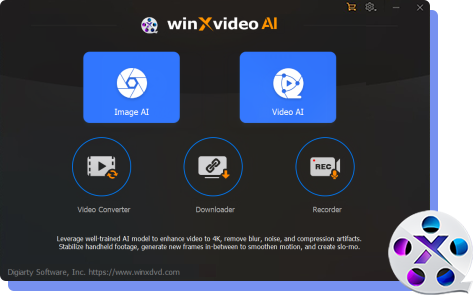
You can free download Winxvideo AI and install it on your PC within few seconds. After a brief installation its user-friendly interface will indicate spontaneously. Nearly all the functions and features if checkable through the main interface. This will maximally save time for both junior and senior users.
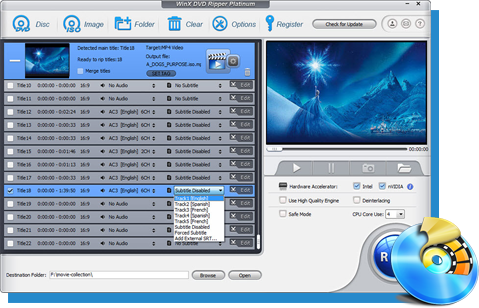
Step 1: To begin with, you should put your MP4 video into Winxvideo AI by clicking "+Video" button.
Step 2: Secondly, choose output format profile. You can follow this: Output Profile Category - HD Video - MTS Video, then click "OK". Thanks to a huge amount of output options, Winxvideo AI earns its fame of a powerful video converter, such as convert MP4 to WMV, to MKV, or convert for playing videos on portable devices such as iPhone, iPad, Samsung, PS5, Xbox, Sony, etc.

Step 3: Winxvideo AI allows you to customize the output parameters, like Audio/Video Quality, Audio sample rate, Video frame rate, Output image setting, video resolution and Audio/Video codec, by clicking the gear-wheel-shaped button. You can customize these data to achieve the best quality you prefered. You can also Rename and Edit the video. What's more, Winxvideo AI supports choosing your favorate subtitle track or even adding external .aas/.srt subtitle files downloaded from the internet.
Other convenience brought by the MP4 to AVCHD converter is you can easily set the destination and open converted file folder with Browse and Open button.
Step 4: Finally, you can just click the Run button to start converting MP4 to AVCHD format. You can choose to shut down your computer or open the output folder after conversion so you don't have to sit before your computer waiting for the conversion to finish.
2. TalkHelper MP4 to AVCHD Converter
TalkHelper Video Converter is an all-in-one video conversion program that is able to convert video from or to most popular video formats including MP4, MKV, MOV, AVCHD, MTS/M2TS, HEVC, H.264/AVC, MP3 and more. It adopts the top-notch algorithms for video quality and speed, so that you are able to enjoy lossless and fast video conversion.
How to Convert MP4 to AVCHD with TalkHelper
Step 1. Download MP4 to AVCHD Converter, install and launch it on your Windows PC.
Step 2. Import your MP4 file into TalkHelper Video Converter by clicking on "Add Media"->"Add Files" menu.
Step 3. Select AVCHD under "Output Format" drop-down menu.
Step 4. Click "Start Convert" button to transcode MP4 video to AVCHD with lossless quality.

3. Filestar
Filestar is known to do anything with any file. With an intuitive interface, it helps users save time and get rid of repetitive tasks while processing videos. It allows you to convert, resize, compress, merge videos and more. It supports 807 different file types, and over 30,000 file conversion skills can be done at your fingertips. It's quite quick and straightforward, even the green hand can convert video files easily with it.
How to Convert MP4 to AVCHD M2TS/MTS with Filestar
Step 1. Download and install the latest version of Filestar.
Step 2. Right click on one or more Mp4 file(s) on your desktop and select Convert with Filestar.
Step 3. Type convert to avchd in the search box.
Step 4. Press Convert.

4. AnyMP4 Video Converter Ultimate
AnyMP4 Video Converter Ultimate is another AVCHD video converter, which enables users to convert MP4 to AVCHD with ultrafast conversion speed. It supports to convert video files over 200 formats including DVD, edit AVCHD video before converting such as rotate, clip, crop, filters, subtitle, audio tracks, etc. Moreover, it's able to create split-screen video presentations with multiple AVCHD recordings.
How to Convert MP4 to AVCHD through AnyMP4 Video Converter Ultimate
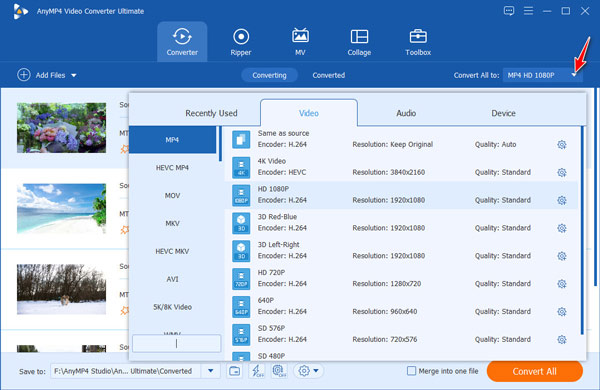
Step 1. Launch AnyMP4 Video Converter Ultimate on your Windows or Mac computer. Tap "Add Files" button to import your MP4 videos. This can also be done through drag and drop.
Step 2. Click and expand the "Convert All to" dropdown option on the upper-right side and choose AVCHD for your device.
Step 3. Edit AVCHD videos optionally. The "Edit" and "Cut" icon under the AVCHD file lets you customize AVCHD videos.
Step 4. Tap the Convetr All button to start converting MP4 to AVCHD.
5. Convert.io
Online video converter is another choice for converting MP4 to AVCHD for free. It never requires any installations on your computer. You can directly fulfill the MP4 to AVCHD conversion through your browsers. However, it depends more on the Internet speed, and the video file size should be less than 100MB.
How to Convert MP4 to AVCHD Online with Convert.io
Step 1. Visit Convert.io official page. And upload your MP4 video by clicking on the "Choose Files" button.
Step 2. Choose AVCHD as the output from the drop-down list of Output Profiles.
Step 3. Tap the "Convert" button to start convering videos immediately. The process will take some time, but it depends more on your video length and network speed.
Step 4. When the conversion is finished, click on the Download button to save your AVCHD video locally.

Suggested reading: more online MP4 video converters >>
Part 2. MP4 vs AVCHD: What's the Difference
Many users may not have a clear understanding of the difference between mp4 and avchd and may be very confused why they need to convert MP4 to AVCHD. Here, I'd like to make a detailed comparison between MP4 and AVCHD.
Firstly, MP4 and AVCHD formats are the most commonly used video recording formats. The obvious difference between AVCHD and MP4 is that the size of the AVCHD file is too large since it has high standard and high quality. And AVCHD is suitable for creating AVCHD or Blu-ray Disc recordings and watching on an HDTV. Whereas, MP4 is much easier to move, copy and upload to web sites or for playing back on portable devices.
Specifications |
AVCHD |
MP4 |
File Extension |
.m2ts, .mts |
.mp4 |
Video Codecs |
H.264/MPEG-4 AVC |
H.264/MPEG-4 AVC, HEVC, MPEG-2 Part 2, MPEG-4 ASP, H.263, and others |
Audio Codecs and channels |
Dolby Digital |
AAC, MP1, MP2, MP3, AC-3, Apple Lossless, ALS, SLS, and others |
Video Resolution |
1920 x 1080/60i, 50i (16:9) |
1440 x 1080/30p (16:9) |
Compatibility |
1. Compatible with the Blu-ray Disc format |
1. Compatible with the Apple® QuickTime® format |