



 win
win

 Super Resolution
  Video Stabilization
  Frame Interpolation

 Denoise Image
  Restore Old Photo
  Unblur Image
  Recover Face
  Upscale Image
  Colorize Photo
 Video Conversion >
 Video Compression >
 Screen Recording >


Top 9 Ways to Convert MPEG to MP4 on Windows 10/11 & Mac
MPEG, short for Moving Picture Experts Group, is a working group of ISO/IEC that sets standards for media compression. Typically, files bearing the .mpeg or .mpg file extensions conform to MPEG video format specifications as outlined by this group. MPEG video files encompass both video and audio data, employing compression techniques like MPEG-1 or MPEG-2. While MPEG compression is widely compatible with many media players, such as VLC, there may be instances where converting MPEG to the MP4 format becomes necessary.
MP4, on one hand, offers significantly reduced file sizes compared to MPEG, thanks to its utilization of advanced video codecs like H.264 or HEVC. These codecs excel at achieving higher compression efficiency when compared to the older MPEG-1 or MPEG-2 standards. On the other hand, MP4 files are inherently more accessible across a diverse array of media players, mobile devices, gaming systems, PCs, and TVs. In this article, we will introduce you to effective methods to seamlessly convert video from .mpeg to .mp4 using professional yet user-friendly MP4 video converter.
Download Free Video Converter to Convert MPEG to MP4
WinX offers a free, safe and clean video converting software, letting you bulk convert MPEG videos to MP4 (H264, HEVC), as well as MOV, AVI, MKV, FLV, WMV, iPhone iPad, Android, etc. Quickly and batch process video files – any format, any resolution, any file size. No quality loss. Load big MPEG (be it 500MB or 100GB) and offer 47X real time converting speed! No half crash or CPU overuse errors!
Table of Contents
Part 1. How to Convert MPEG to MP4 on Windows 10/11?
- Way 1. Use Winxvideo AI
- Way 2. with Cisdem Video Converter
- Way 3. with Handbrake
- Way 4. with Freemake Video Converter
Part 2. How to Convert a MPEG File to MP4 On Mac?
Part 1. How to Convert MPEG to MP4 on windows 10/11?
Speaking of video converters that can work with Windows PCs, there's a huge selection of simple programs, from free to paid, to fully functional ones for advanced users. In the following part, we've picked reliable desktop video converter to encode MPEG file to MP4 format on Windows 11, Windows 10 and older versions.
#1. Winxvideo AI
- Comprehensive evaluation: ★★★★★
- Ease of use: ★★★★★
- Advertisement: No
- Reasons to use: fast conversion speed, 4k support, and multifunctional.
It is our top pick for Best MPEG to MP4 converter for Windows PC without intrusive ads or upsells. It keeps updated with the latest techs, adding timely support for AV1, HEVC, 4K, GPU acceleration, and even the new Windows 10 and Windows 11 OS. With a wide range of input and output formats, it enables you to convert video to MPEG, MP4, MOV, MKV, HEVC, WebM, Xvid, etc, and optimize 4K/HD/SD video files for a variety of devices, be it iPhone, iPad, PS4, Android, Surface or Apple TV.
Advanced users can get full control over the output file, incl. bitrate, resolution, codec, frame rate, aspect ratio, etc. and the output quality won’t be degraded at all. That means you can compress MPG file to smaller MP4 without quality loss visually. On top of that, the whole MPEG to MP4 converting process is pretty fast, achieved through the GPU acceleration tech.
#2. Cisdem Video Converter
- Comprehensive evaluation: ★★★★☆
- Ease of use: ★★★☆☆
- Advertisement: No
- Reasons to use: Support DVD conversion.
Cisdem Video Converter is a top-tier video conversion tool that handles a myriad of video formats, including MP4, MPEG, AVI, MKV, MOV, WMV, AAC, etc, making it a versatile solution for users with diverse media needs. Whether you're looking to convert videos for playback on Apple/Microsoft devices or game consoles, Cisdem's user-friendly interface simplifies the process.
One of the standout features is its ability to rip DVD to a digital file with blazing fast speed. It excels in quickly convert multi-angle DVD or DVD from any region to digital MPEG, MP4 or others without compromising on quality. Additionally, it boasts a range of editing options, allowing users to trim, crop, rotate, and apply effects as needed. With its robust performance and ease of use, Cisdem Video Converter has undoubtedly earned its place as one of the best contenders in the MPEG to MP4 video conversion software landscape.
#3. Handbrake
- Comprehensive evaluation: ★★★★☆
- Ease of use: ★★★☆☆
- Advertisement: No
- Reasons to use: open-source and free, more advanced video customizable features.
Primarily designed as an open-source DVD ripper, Handbrake is now the world’s most well-known transcoder for digital video files, integrated with many third-party video libraries, codes and components, such as FFmpeg, x265, video deinterlacers, etc. This makes it hassle-free to transcode video from nearly any format to modern one, e.g. MPEG/MPG to MP4, MOV to MKV, etc.
Handbrake is deemed as a professional MPEG to MP4 converter in 2026 when it comes to the video customization. You can alter the bitrate, change the sample rate, set the file size or bitrate. It also supports adaptive deinterlacing, scaling, cropping, both automatic and manual. But these features come at the expense of user experience. It is more accessible for advanced users rather than the green hands.
#4. Freemake Video Converter
- Comprehensive evaluation: ★★★☆☆
- Ease of use: ★★★★☆
- Advertisement: YES
- Reasons to use: Support 500+ formats, burn to disc.
Freemake has built a cult following among Windows users as a free video converter for years. It supports converting a massive number of formats like AVI, MP4, MPEG, MKV, FLV, WMV, 3GP, SWF, MPG, AVCHD, and so on. It also features a DVD burner and video editor, enabling you to burn to DVD, add subtitles, crop video, etc.
However, the free version seems to be unusable. For example, the video conversion, including MPEG to MP4 encoding, isn’t speedy. It isn’t updated frequently. Besides, Freemake logo is accompanied with the converted video if you don’t upgrade to its paid version. You can choose to spend $5 per week or $10 per month to remove the limits.
[Tutorial] How Do I Convert MPEG to MP4 on Windows 10/11?
These best MPEG to MP4 converter software shares almost the same workflow, as long as you are not requiring more features or options. Here are take converting video from .mpg to .mp4 using Winxvideo AI for example.
Step 1. Free download the MPEG video converter on Windows 10 or Windows 11. Follow the instruction and install it on PC computer. Open it.
Step 2. Click +Video button to load the MPEG file to be converted. It takes just a few seconds only. You can add multiple .mpeg file at a time. It supports batch conversion with no limit to file size, length, or resolution.
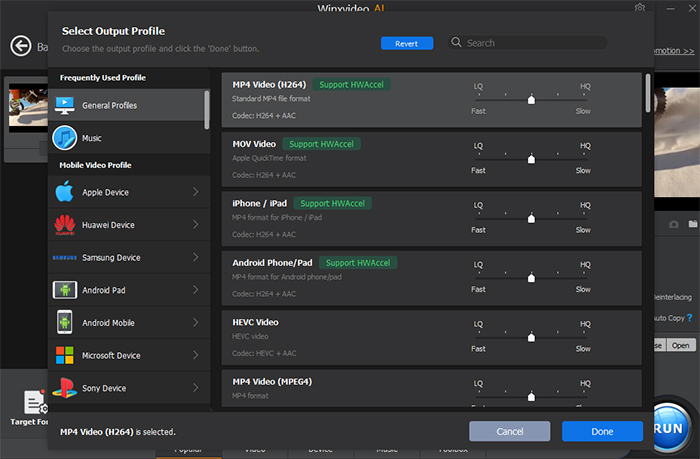
Step 3. After loading the MPEG file, a pop-up window appears, where you can choose the output format as per your needs. To transcode MPEG to MP4 format, you can go to the General Profile > MP4 Video (H.264), which is widely compatible with the mainstream platforms.
Step 4. Tap Browse to save the converted file, and press RUN to begin transforming MPEG to MP4 on your Windows PC. Generally, the hardware acceleration is automatically enabled to speed up the converting process. So it won’t take a long time.
Part 2. How to Convert MPEG File to MP4 On Mac (incl. Sonoma)?
Right now, many video converters work with both windows and Mac platforms. But Mac users are wishing to get the truly mac-intuitive and self-explanatory interface and do the MPEG to MP4 conversion job extremely fluid on macOS, including the latest Sonoma. So here we pick up two Mac-specific video converters for you.
#1. MacX Video Converter Pro
- Comprehensive evaluation: ★★★★★
- Ease of use: ★★★★★
- Advertisement: No
- Reasons to use: 370+ inputs and 420+ outputs, good quality, also a screen recorder.
MacX Video Converter Pro has been dedicated to converting video files on macOS platform for years. With over 370+ video/audio codecs and 420+ preset profiles,It is well equipped to handle almost all video conversion tasks, including MPEG to MP4 converting. It goes up to 4k, regardless of whatever codec, bitrate, or file size.
You can get a few basic yet indispensable editing options, the options to download online video, compress large video file, adjust video parameters, and even record Mac screen at will. But these features are all wrapped under an intuitive interface. You won’t spend too much time getting around it.
#2. AnyMP4 Studio
- Comprehensive evaluation: ★★★☆☆
- Ease of use: ★★★★★
- Advertisement: No
- Reasons to use: Available on App Store, easy to use.
AnyMP4 Free MP4 Converter isn’t the most powerful software in our list of the best MPEG to MP4 converters here, but it is the only desktop software recommended by App Store. So it is absolutely safe to download on your Mac. With it, you can freely convert any video format to/from MP4 on macOS for playback on iPhone, iPad, and Apple TV.
There is a reminder. The free MP4 converter boasts the abilities to convert 2D to 3D, but it realizes only when you upgrade to its paid version priced at $29.92. Plus, you cannot upscale videos to HD or 4K, enhance the video quality, or add external audio track or subtitles to the video, unless you pay for its pro versions.
[Tutorial] How to Convert MPEG to MP4 on Mac?
If you want to have your MPEG files played on your Macbook, iMac, iPhone, iPad, or Apple TV, check the following part. Learn how to run the MacX Video Converter Pro to do the mpeg to MP4 format conversion on macOS, and then sync the file to your device for later viewing.
Step 1. Free download the MPEG to MP4 converter on your Mac. Note: macOS catalina or higher versions do not support the 32-bit apps. So make sure your video converter is 64-bit. Then launch it on your Mac.
Step 2. Drag and drop the local MPEG file on your Mac or you can add the file by clicking +Video button on the top left corner of the main interface.
Step 3. Go to General Video > choose MP4 video as the output format. You can also choose profiles such as iPhone, iPad as the output format. The output file will be optimized for your destination device without tweaking any other parameters.
Step 4. Click Browse button to set the output path for the converted MPG files.
Step 5. Click RUN button to begin the conversion. Then you can transfer the converted files from your Mac to iPhone or iPad with data transfer software.

Part 3. How to Free Convert MPEG to MP4 Online?
There are many ways to realize the MPEG to MP4 transcoding. The most easy way is to rely on online video converter sites to do the task. There are majorly two reasons of using online services to convert MPEGs to MP4.
- Encoding MPEG to MP4 can be done without installation, which saves time to download or install the software. You can also save the storage space required to download the desktop software.
- Online MPEG to MP4 converters generally have less features than desktop software. This means the whole converting process can be particularly easy for beginners. So you can do the job in a few clicks.
Online services also have some limits on size, speed, etc. We only recommend a free online service to convert MPEG to MP4 in the following cases:
- When you want to convert only one or two MPEG files to MP4.
- When your computer has little free storage space.
- When the video is smaller in size, generally less than 1GB, and preferably less than 100MB.
- When the video is not originally high quality.
- When you want to convert video in an environment where video converter software doesn’t support, such as Mac, Windows, Linux or smartphone.
If you are in the above circumstances, check the follow online MPEG to MP4 converters.
#1. Cloudconvert
- Comprehensive evaluation: ★★★★☆
- Safety: ★★★★☆
- Advertisement: No
CloudConvert, developed by a German company, has been a one-stop solution for all your file conversion needs, allowing to convert any format, from audio, CAD, document, archive, image, spreadsheet, to video. You can upload a local file, file from OneDrive, Google Drive, Dropbox, and even convert URLs of any website with ease.
When it comes to an online video converter, you can freely convert MPEG to MP4 or other media format without a hassle. However, the free plan offers 5 concurrent conversions and each video file should not exceed 1GB in size. You can convert up to 25 video files each day. So if you have more than one MPEG file, just have a try.
#2. Freeconvert
- Comprehensive evaluation: ★★★☆☆
- Safety: ★★☆☆☆
- Advertisement: Yes.
FreeConvert is a popularly used online MPEG video converter to MP4 that features a simple interface and is compatible with all the latest browsers. You can convert video files without any additional installation or registration. A maximum of up to 1GB files can be uploaded to the online tool for conversion. You can also have 25 conversions per month in the free mode.
The advanced settings options are available for you to tweak the video codec, screen size, aspect ratio, frame rate, audio codec, etc. You can also do some basic editing, such as trimming, otating, flipping, adding subtitle, etc. FreeConvert also offers pro editions starting from $9.99 per month, with which you can ensure more conversion minutes, merge maximally 40 files at a time, and do the whole conversion without ads.
#3. ConvertFiles
- Comprehensive evaluation: ★★★☆☆
- Safety: ★★☆☆☆
- Advertisement: Yes.
ConvertFiles is another tools for changing file formats online. Not only does it work well with video and audio files, but it also support converting images, documents, archives, etc. On top of that, it is totally free of charge.
The website can process maximally 250MB video file currently. Once you upload the file, you can wait for a moment and then download the converted file as soon as possible. ConvertFiles just keep the file for 1 hour once it’s been converted. So make sure to download it within the period.
[Tutorial] How to Free Convert MPEG File to MP4 Online?
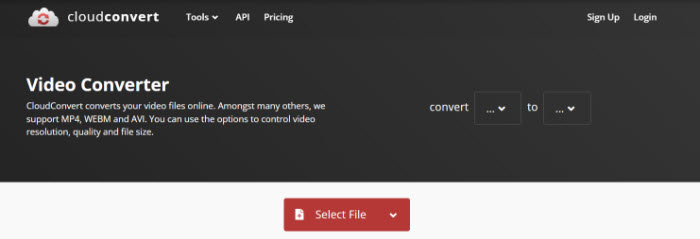
All the best online MPEG to MP4 converters share the same workflow and are pretty easy to use. You can follow the steps to convert MPEG to MP4 for free using CloudConvert.
Step 1. Click Choose Files, Select File or the like to upload one or more MPEG files. Most online video converters support add files locally or from cloud service.
Step 2. Choose the output format MP4.
Step 3. Click Convert to kick off the MPEG to MP4 conversion.
Step 4. Hit Download to save the converted file on your computer.
Suggested reading: online MP4 video converters >>
Part 4. FAQs about MPEG to MP4 Conversion
1. What is the difference between MPEG and MP4?
Generally, a video in MPEG format is compressed using either MPEG-1 or MPEG-2 compression. While a video in MP4 format is compressed using MPEG-4, AVC, HEVC or some other compression standards. The file with MPEG format is saved as .mpeg or .mpg, but the file with MP4 format is saved as .mp4. Format in MPEG stores only video files while in MP4 stores not only video file, but also subtitles, still image and many other things. When it comes to the usage, MP4 is widely streamed on computers, smartphones while MPEG is limited to DVDs and digital television broadcasting. So in many cases, you can take advantages of a video converter to convert MPEG video to MP4 format.
2. How to convert MPEG to MP4 on iPhone?
If you want to convert MPEG to MP4 format directly on your iPhone, you can try The Video Converter by Float Tech, LLC, which can quickly convert your videos to nearly any video or audio format.
Step 1. Select your input file MPEG.
Step 2. Choose your output format like MP4.
Step 3. Tap Convert. It takes a few seconds.
Step 4. Save your file.
3. How do I convert MPEG to MP4 using VLC media player?
VLC is a free open-source media player recognized for its flexibility and support of almost any video format imaginable. But you can also use VLC to convert MPEG to the broadly compatible format MP4 for free on Windows 10/11 or Mac. Here is the guide.
Step 1. Open VLC on your PC. Click Media > Convert / Save …
Step 2. Click Add… to load the MPEG file you want to convert. Press Convert / Save button.
Step 3. Click the dropdown menu next to the Profile in the Convert Window. Then select MP4 as the output format.
Step 4. Tap Browse to choose a destination folder for the new MP4 file.
Step 5. Click Start to begin converting MPEG to MP4 format. The time VLC takes to convert the video is relatively slow, since VLC just features hardware decoding. If the MPEG file is large, you’d better resort to a professional desktop software.
External Knowledge
What is MPEG: MPEG stands for Moving Pictures Expert Group. MPEG-1 is the video format that has had some extremely popular spin-offs and side products, most notably MP3 and Video CD. MPEG-2 is not a successor for MPEG-1, but an addition instead. MPEG-2 is used in digital TVs, DVD-Videos and in SVCDs.
What is MP4: An ISO/IEC standard 14496 developed by the Moving Picture Experts Group (MPEG). MP4 is a new container format, a container format allows you to combine different multimedia streams into one single file. MP4 is streamable and supports all kinds of multimedia content. Virtually all playing hardware, software, devices and tools, including iPhone/iPod/iPad, support MP4 container and MP4 format videos.