




Handbrake Blu-Ray Tutorial: How to Rip Blu-Ray with Handbrake
Blu-Ray discs offer exceptional video quality, but they can also be bulky and inconvenient to carry around. Many people wonder if they can use the free open-source software tool, HandBrake, to rip their Blu-Ray discs, just like they do with DVDs.
Does HandBrake support Blu-Ray? Can HandBrake rip Blu-Ray discs? The answer is both yes and no. If your Blu-Ray disc is not copyright protected, you can use HandBrake to rip it. However, if the Blu-Ray disc is copyrighted (which is the case for most discs), HandBrake may not be able to decrypt it.
In this article, we will provide you with a step-by-step guide on how to rip a Blu-Ray disc with HandBrake, and what to do if HandBrake fails to decrypt your Blu-Ray disc. Let's dive into the details.

Table of Contents:
Part 1. Can Handbrake Rip Protected Blu-ray Discs?
HandBrake recently announced a major release of version 1.6 on December 28 2022, which includes new features, bug fixes, and improvements. With enhanced and robust QSV, Nvidia NVENC, and AM VCE hardware encoding, as well as an ever-expanding profiles list, Handbrake now makes ripping Blu-Ray faster with more exporting options. However, it's important to note that this is only possible if your Blu-ray discs are not copy-protected.
Just like Handbrake needs libdvdcss to read CSS-encrypted DVDs, neither HandBrake 1.6.1 nor any other versions can rip protected Blu-Ray discs out of the box. In this case, a piece of third-party decrypter software is required. Definitely, if your Blu-Rays are homemade or unprotected, the process of ripping them with HandBrake can be quite easy since HandBrake recognizes the Blu-Ray disc structure.
In the following part 2 and part 3, we will guide you through the process of ripping Blu-Ray with HandBrake on Windows or Mac OS, along with a tutorial to rip encrypted Blu-Ray using Handbrake and a solid Blu-Ray Decrypter.
Part 2. How to Rip Unprotected Blu-Ray with HandBrake?
Before ripping Blu-Ray using Handbrake, make sure to invest a Blu-Ray drive in order to read the Blu-Ray disc. Most disc drives built into your computer are actually DVD drives that may not be able to read the Blu-Rray disc at all. If you want to rip 4K Blu-Ray with HandBrake, you'll need to make sure that the Blu-Ray drive you have is 4K-friendly as well. You can either connect the drive over USB or install an internal one into your desktop.
Once you have a compatible Blu-Ray drive, you can begin the process of ripping unprotected Blu-Rays using HandBrake. The following steps will guide you through the process:
Step 1. Insert the unprotected Blu-Ray disc into your computer's Blu-Ray drive.
Note: Before inserting a Blu-Ray to rip with Handbrake, remember that Handbrake can only convert Blu-Rays that can be played in your Blu-Ray player. So if you've got a BD filled with video files, such as AVI, MPG, WMV, MOV, etc, Handbrake won't convert them.
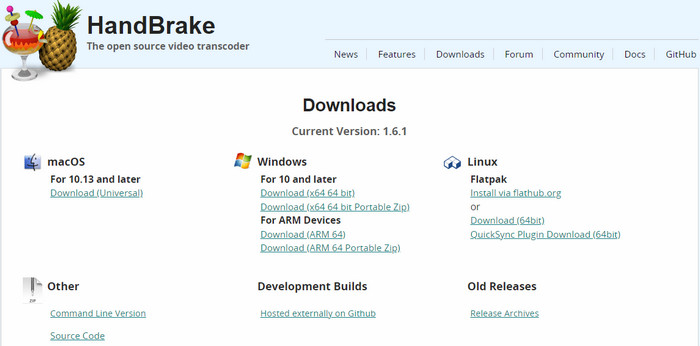
Step 2. Download and install Handbrake Blu-ray ripper.
HandBrake is compatible with Windows, Mac, and Linux. You can download and install the latest version or an old one based on the operating system you use and your preferences.
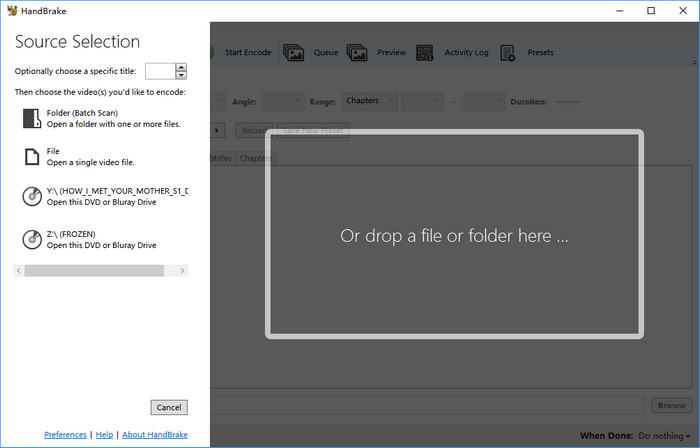
Step 3. Open the Blu-Ray on HandBrake.
Open HandBrake Blu-Ray ripper and select your Blu-Ray drive as the source under the Source Selection section. The GUI of HandBrake Windows edition has been improved to support Drag / Drop Video onto Main Window to scan. But you can't do this with Blu-Ray disc.
Then HandBrake will scan your Blu-Ray disc. It will take a while to finish scanning 95 titles Blu-Ray. So you need to be patient with this procedure.
If you get the error "No valid source or titles found" after scanning, your source may be copy protected, badly mastered or in a format which HandBrake does not support. At this moment, you may need to make use of a third-party program such as MakeMKV to decrypt the Blu-Ray disc.
Step 4. Select the title(s) you want to rip.
After finishing scanning, Handbrake will display a list of titles that it has found. Look for the title that corresponds to the movie you want to rip, and select it.

Step 5. Choose the output preset and format that you want.
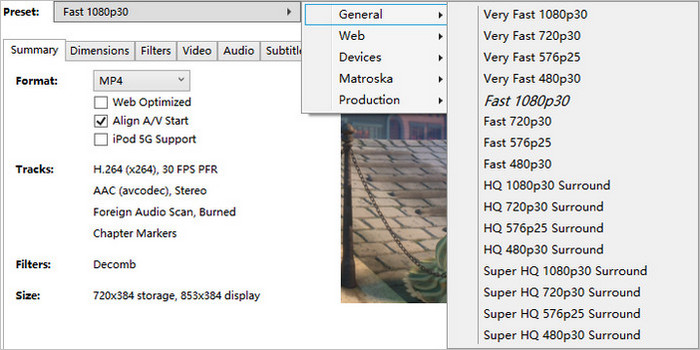
HandBrake can convert Blu-Ray to MP4, MKV, and WebM format. Meanwhile, it offers a variety of presets. Choose the one you prefer from the dropdown menu of "Presets".
Basically, Fast 1080p30 is selected by default. While super HD 1080p30 Surround gives you a higher quality result than fast 720p30, but results in bigger size and slower encoding speed. 720p30 profiles are also available, which can reduce the Blu-ray file size dramatically and therefore save a ton of space, but come at the cost of great quality loss. Just choose the one you like. If you are converting 4K bluray copy to MKV using Handbrake, you can also choose Matroska > H.265 or VP9 2160p60 to keep as much detail as possible while still compressing the video file to a large extent.
Step 6. Configure the video audio settings and subtitles.
Handbrake provides many video settings you can configure in the Video tab, including video codec, resolution, frame rate, bitrate, and quality. You can adjust these settings to your liking, but keep in mind that higher quality settings will result in larger file sizes and longer encoding times.
Handbrake also lets you choose the audio track(s) you want to include in your rip, as well as the audio format and bitrate. All these options can be found in the Audio tab.
If you want to include subtitles in your rip, Handbrake provides options to choose the subtitle track(s) and adjust their settings.
What's the best HandBrake settings for Blu-Ray ripping?
When using Handbrake to rip Blu-Ray discs, the best settings will depend on your preferences and the capabilities of your computer and playback device. For example, if you're ripping a Blu-Ray for playback on a mobile device, you may want to choose a lower resolution and bitrate to reduce file size and optimize playback performance. On the other hand, if you're ripping a Blu-ray for archival purposes, you may want to choose a higher resolution and bitrate to ensure maximum quality.
Some key settings to consider include:
Video codec: H.264 is a widely used codec for Blu-ray rips, but you could also consider H.265 (HEVC) if your playback device supports it.
Video quality: You can adjust the video quality using the Constant Quality setting. A value of 20-23 is typically recommended for Blu-ray rips.
Audio codec: For best compatibility, use AAC or AC3 for the audio codec. For a higher audio quality, change the AAC to the Passthru option.

Step 7. Choose a destination for your rip.
The default location for Handbrake's output files is the Desktop. Choose a different location if you'd like to save your file elsewhere.
You simply need to click the "Browse" button beside the field of "Save As" to specify where you want Handbrake to save your Blu-Ray rip. Make sure you have enough free space on the selected drive. Ideally you can rip 50GB Blu-ray to 10GB MKV while still keeping 1080p full-HD quality. If you need full control on the output video, to calculate Handbrake video bitrate/quality settings is necessary, or you may run into Handbrake output video quality poor problem.
Step 8. Start the Blu-Ray ripping process.
If you have finish all HandBrake settings for Blu-Ray rip, simply click the "Start Encode" button in Handbrake's main window to start the ripping process. This may take some time. Ripping Bluray to MKV or MP4 format is a hardcore process, because Handbrake needs to decode Blu-ray M2TS video and encodes to the format you choose, which is also in HD quality. Therefore the Blu-ray conversion could be a half day's journey.

Part 3. How to Rip Protected Blu-Ray with HandBrake?
Since most Blu-Ray discs are protected with AACS, BD+, or other sophisticated protection methods, it's hardly a seamless experience to rip Blu-ray using Handbrake only. You need application like MakeMKV to rip your Blu-rays into unprotected files and then compress the Blu-ray copies into smaller ones using Handbrake. Let's get started.
Step 1. Download and install MakeMKV, a dead simple program that can rip Blu-ray to MKV file on your computer. Basically, the beta version is OK in ripping Blu-ray disc, even if it is protected. Then put the Blu-ray disc in your Blu-ray drive and open the program.
Step 2. On the main interface you can see a big Blu-ray drive icon appearing, click it and let MakeMKV scan the titles, after which you can see a list of titles in the left panel. Choose the title you want to rip. In general, the real title takes up around 20-30GB. Pick the it.

Step 3. Choose the destination folder where you'd like to save the Blu-ray copy. Make sure your hard drive has more than 30GB free space.
Step 4. Click Make MKV button with the green arrow. MakeMKV will start ripping Blu-ray to MKV in around 20-30 minutes. Generally the HD/4K Blu-ray rip is around 20-50 GB in size, which can be a waste of resource to store and play the huge MKV without compression. So you can then use Handbrake to convert Bluray copy to a smaller file if necessary.

Step 5. Go to Handbrake, and click File to add the Blu-ray movie you want to convert, or you can load the ripped MKV file under the Source Selection. It will scan the details about the Blu-ray rip.

Step 6. Click the Browse button to choose the destination for the final video.
Step 7. Choose the best Handbrake settings for Blu-ray.
- First of all, go to the Preset in the toolbar, choose an option from the sidebar.
- Secondly, go to Video/Audio tab and choose more advanced settings for Blu-ray. Set the Frame rate to Same as Source, adjust the RF for higher quality, go to Audio tab and change the AAC to the Passthru option if you want a higher audio quality.

Step 8. When everything is ready, click the Start Encode button to begin converting Blu-ray copy to MP4, MKV, or WebM in Handbrake.
Part 4. Handbrake Alternative to Rip All Protected DVDs to iPhone, iPad, Android
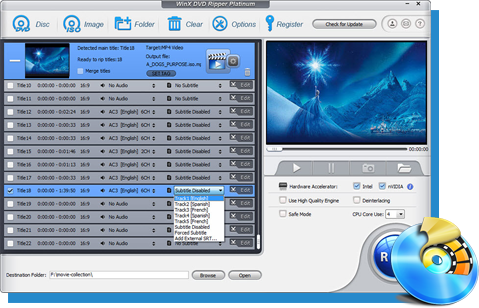
Aside from the need to rip copy-protected Blu-rays, some individuals also require the capability to rip copy-protected DVDs. Unfortunately, HandBrake lacks this functionality. If you find yourself in this situation, you might want to consider using WinX DVD Ripper, which is the best alternative to HandBrake.
WinX DVD Ripper is frequently updated to ensure compatibility with the latest DVDs and copy protection schemes. It can convert a variety of DVDs, including those with 99 titles, those that are damaged, newly released movies, unplayable DVDs, or workout discs, into various formats such as MP4, AVI, MPEG, WMV, MOV, FLV, M2TS, MP3, and more. By effortlessly circumventing copy protection mechanisms, it enables users to play any type of DVD on their iPhone, iPod, iPad, Android, and other devices.
Disclaimer: Digiarty Software advocates backing up your own purchased Blu-ray discs ONLY for fair use. It doesn't advocate ripping copyrighted Blu-ray for illegally selling, distribution, or any commercial purpose.