



Get WinX HD Video Converter Deluxe Giveaway/Lifetime License Code
Important Note: WinX HD Video Converter Deluxe has been fully upgraded to Winxvideo AI, a much more powerful AI-driven video and image enhancement toolkit. It seamlessly inherits all the conversion features of Deluxe while adding cutting-edge AI models (AI Super Resolution, Stabilization, Frame Interpolation, Face Recovery, etc.), plus professional editing, compressing, and screen recording tools.
You can grab the official, genuine Winxvideo AI free giveaway license code directly from our authorized regular holiday giveaway campaign.
👉 Go to the Official Winxvideo AI Giveaway Page to Get Your Free License Cod >>
Table of Contents
- Part 1. Get FREE License Code to Enjoy Winxvideo AI (Upgraded WinX HD Video Converter Deluxe) Full Features
- Part 2. What's Difference of Winxvideo AI and Leaked License Code?
- Part 3. What Can Winxvideo AI (The Evolution of Deluxe) Do?
- Part 4. How to Activate Winxvideo AI with Free License Code?
- Part 5. How to Convert Video with Winxvideo AI?
Part 1. Get FREE License Code to Enjoy Winxvideo AI Full Features NOW!
The only way to grab the latest and official Winxvideo AI (formerly WinX HD Video Converter Deluxe) registration license key is through our official event page:
Winxvideo AI
All-in-one software to convert, compress, edit, record, and AI-enhance (up to 4K/8K) any video/image. Support for 370+ input formats and 350+ profiles.
- Convert any SD/HD/4K video from/to MP4, H264, HEVC.
- Decode video for mobiles, Xbox, PS4 with 420+ profiles.
- Compress large-sized 4K video for faster uploading.
- Record screen, edit, merge, crop, trim, add SRT to video.
- AI enhance and upscale videos/images up to 4K/8K/10K.

- Enjoy free upgrade to any future version
- No.1 fast media toolkit, Level-3 HW acceleration tech supported!
- Free tech support 24/7
- Reasonable price, even lower than a pillowcase
- Unlock and use full features in V3.2
- New features disabled
- Free update disabled
What Problems You May Encounter If You Process Videos without License Code?
Using the trial version without a valid registration code brings several strict limitations that will hold you back from full video processing and AI enhancement:
- 5-Minute Processing Limit: You can only convert or enhance each video for up to 5 minutes, which means goodbye to full-length movies or long family videos.
- No AI Features Allowed: The revolutionary AI capabilities—including AI Video/Image Super Resolution (up to 4K/8K), Face Restoration, Stabilization, and Frame Interpolation—will be completely locked or watermarked.
- Limited Hardware Acceleration: Without full activation, you cannot leverage the maximum speed of Level-3 Hardware Acceleration, resulting in slower rendering times and high CPU usage.
- Missing Profiles & Formats: You won't get access to the full library of 350+ optimized profiles and advanced multi-track HD/4K formats, leading to potential conversion failures.
- No Batch Processing: You have to convert videos one by one manually, instead of saving time with fast batch processing.
Don't let these limitations ruin your experience! Let's get a free official license code right now to unlock all capabilities.
When searching for WinX HD Video Converter Deluxe license code or Winxvideo AI serial key online, you will see many third-party sites offering "cracked" or "leaked" keys. Here is why you should always stick to the official giveaway channel.
Part 2. What's Difference of Winxvideo AI Official and Cracked License Code?
 Official license code given by Digiarty
- 100%
- 0%
- 100%
- 100%
- 100%
- 100%

- Legitimacy
- Risks (malware, virus...)
- Validity
- Latest Version
- Features Available
- Tech Support
 Crack key via illegal means
- 0%
- 98%
- 10% or less
- 30% or less
- 30%
- 0%
Note: If you have accidentally visited malicious coupon or crack sites, we highly recommend clearing your browser cookies, visiting our official site, and safely claiming your free code from our Official Giveaway Page.
Part 3. What Can Winxvideo AI Do?
As the perfect successor to WinX HD Video Converter Deluxe, Winxvideo AI elevates your video processing experience with advanced AI integration while keeping the robust core conversion engine intact:
- Revive old, low-res, or blurry videos and images. Upscale to 4K/8K/10K, stabilize shaky footage, and boost frame rates up to 120/480fps for smoother viewing.
- Convert video to MP4, H264, HEVC, FLV, AVI, etc. for uploading to YouTube, Vimeo, Vevo, Instagram, etc. for sharing.
- Transcode video or movie to iPhone iPad, Android (Samsung, Huawei, Sony), Google Pixel, Surface Pro 4, Xbox One S, PS4, etc. compatible formats for playback during the trip.
- Encode 4K Ultra HD video shot by GoPro, Drone, surveillance camera to iMovie, Final Cut Pro, Windows Movie Maker supported formats and parameters for further editing.
- Compress large-sized 4K/8K video footage to 1080p/720p with roughly 90% size off for faster video uploading and better storage on your mobile device, cloud service, USB drive.
- Trim, crop, merge, add subtitles, and adjust parameters like bitrate, aspect ratio, adn capture full or selected areas of your screen, webcam, or record both simultaneously with audio-ideal for gameplay, tutorials, and online meetings.
Part 4. How to Get and Activate Winxvideo AI with Free License Code
Step 1. Visit the official Winxvideo AI giveaway page.
Step 2. Click the "Get Free License" button to download the setup package and receive your genuine giveaway license cod sent to your email.
Step 3. Open the installer file and follow the on-screen instructions to complete the installation on your Windows PC.
Step 4. Launch the program. Paste your official free license code into the activation window, enter your email address, and click "Activate" to unlock full features.
The world's No.1 fast video converter license code is subjected to a 50% off discount (now USD 29.95 only) and is accompany with the privilege of lifetime free update and technical support.
Part 5. How to Convert and Enhance Videos with Your Licensed Copy
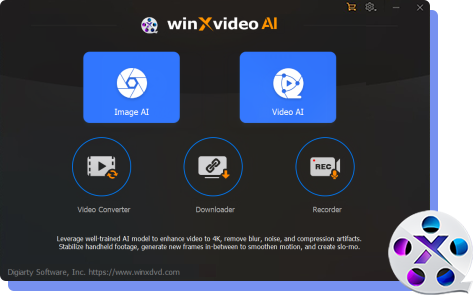
Step 1. Run Winxvideo AI. On the main interface, select a module based on your needs: Video Converter, Video AI, Image AI, or Recorder.

Step 2 (for Conversion). Click on Video Converter, then click the +Video button at the top to import your video file(s). Batch conversion is fully supported.
Step 3. Choose the output format from the pop-up interface. With this all-covered video converter, you're able to transcode video to to 4K MP4 H264, 4K MP4 HEVC, 2K MP4, AVI, MKV, FLV, WMV, mobile devices (Apple, Android, Microsoft, Sony) under Device Profile or audio formats.
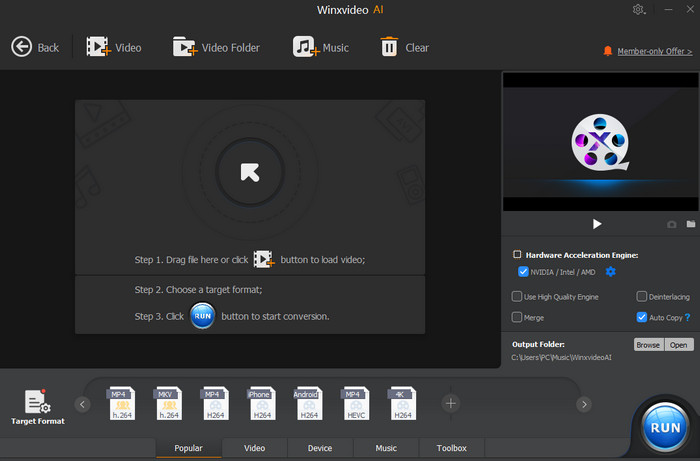
Step 4. Click "OK" > Tap "RUN". Then the WinX's video conversion engine goes into action to decode video at hardware accelerated speed.
If you wish to enhance old videos or restore faces, simply enter the Video AI or Image AI module from the main interface, load your file, choose "Super Resolution" or "Frame Interpolation", and hit export!
What Our Users Say about Our Product? Featured Reviews
-
Reviewed 3 months ago
 Clark. Sweeny
I've always had great experiences with this company, so after an easy download tonight, installation, and registration, I decided to buy the lifetime upgrade license for $29.99.

-
Reviewed 21 minutes ago
Preston Mitchell
I have a dual-OS PC. WinX runs perfectly in both Win 7 Pro SP1 x64 and Win 10 Pro b1809 x64. WinX customer service is very responsive. They're worth the high score of 5 stars!

-
Reviewed 18 hours ago
 Keith Phelps
I bought this program a few years back and have enjoyed it greatly. I have the lifetime license and shrink video to 720p for my wife's' and my tablets. Works everytime.

-
Reviewed 10 days ago
dadams
Winxvideo AI excels at this, employing cutting-edge Super Resolution technology to upscale videos by up to 400% to stunning 1080P, 4K.

-
Reviewed 22 days ago
Joyce
GREAT VIDEO PRODUCTS FROM THIS COMPANY. I tried and then purchased the WinX platinum ripper. Both, perform very well. So far, this entry looks good also. Will prolly purchase.